
HIPAA cloud misconfigurations are one of the most common—and most preventable—causes of healthcare data breaches. As healthcare organizations and SaaS platforms move protected health information (PHI) into AWS, Azure, and Google Cloud, breaches are increasingly caused not by sophisticated cyberattacks, but by incorrect cloud configurations, missing agreements, and misunderstood responsibility models.
If you’re already running PHI in the cloud, the fastest way to find hidden exposure is a cloud-specific HIPAA risk assessment.
The cloud itself is not the compliance problem.
Misconfigured cloud environments are.
This guide explains the most common HIPAA cloud misconfigurations, how PHI is exposed in cloud storage, and how to choose a cloud security provider that actually prevents HIPAA violations—not just promises compliance.
What Are HIPAA Cloud Misconfigurations?
HIPAA cloud misconfigurations occur when cloud infrastructure settings fail to meet the administrative, physical, or technical safeguard requirements of the HIPAA Security Rule.
Standalone Answer Block
A HIPAA cloud misconfiguration is any incorrect or incomplete cloud setting—such as public storage access, weak identity controls, missing encryption, or lack of audit logging—that exposes protected health information (PHI) or violates HIPAA Security Rule requirements.
HIPAA requires covered entities and business associates to implement administrative, physical, and technical safeguards to protect PHI, regardless of whether data is stored on-premises or in the cloud.
(See the HIPAA Security Rule administrative, physical, and technical safeguards.)
The Most Common HIPAA Cloud Misconfigurations That Expose PHI
Publicly Accessible Cloud Storage Buckets
Public cloud storage is the single most common cause of HIPAA cloud breaches. In many cases, PHI is exposed not through hacking, but through storage services that were never intended to be internet-facing.
Common examples include:
- AWS S3 buckets configured for public access
- Azure Blob containers with anonymous permissions
- Google Cloud Storage buckets exposed to the internet
If protected health information is stored in a publicly accessible bucket—even unintentionally—it is considered an impermissible disclosure under HIPAA and may trigger breach notification requirements.
To reduce this risk, organizations should not only lock down cloud storage access, but also ensure PHI is transferred and accessed through secure, authenticated channels. Using a dedicated HIPAA-compliant SFTP server helps prevent accidental public exposure by enforcing encryption, user authentication, and access logging during file transfers.
Missing or Incomplete Business Associate Agreements (BAAs)
Cloud platforms are not automatically HIPAA compliant.
If your cloud provider:
- Does not sign a Business Associate Agreement (BAA)
- Excludes certain services from the BAA
- Requires “self-attestation” for compliance
You are assuming full liability for any exposure of PHI.
The HHS Office for Civil Rights guidance on cloud computing and HIPAA makes it clear: cloud service providers that handle PHI are business associates and must sign BAAs.
Overly Permissive IAM Roles and Access Policies
Cloud identity and access management (IAM) misconfigurations often allow:
- Developers unnecessary access to production PHI
- Shared or generic admin accounts
- No separation between system, service, and human access
HIPAA’s minimum necessary standard requires access to be restricted to what users need to perform their job functions. Broad IAM permissions are a frequent audit finding.
Unencrypted Data at Rest or in Transit
Encryption failures remain a leading enforcement issue.
Common mistakes include:
- Storage encryption disabled by default
- APIs transmitting PHI without TLS
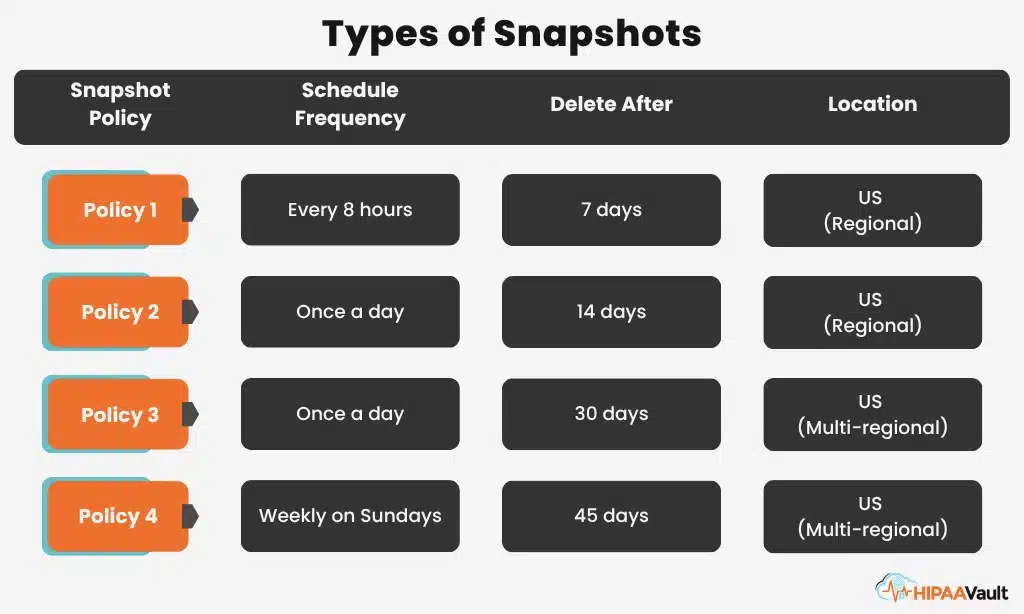
- Backups and snapshots left unencrypted
While encryption is “addressable” under HIPAA, OCR expects strong encryption for cloud environments due to the elevated risk profile.
Disabled or Missing Audit Logs
If you cannot determine:
- Who accessed PHI
- When they accessed it
- What actions they performed
You are not meeting HIPAA audit control requirements.
HIPAA requires covered entities to implement technical controls that record and examine activity in systems containing PHI. Cloud-native logging tools must be enabled, retained, and reviewed.
No Cloud-Specific HIPAA Risk Analysis
Many organizations run a generic HIPAA risk assessment and assume it applies to the cloud. It does not.
Cloud environments introduce risks related to:
- Shared responsibility models
- API exposure
- Cross-region replication
- Backup and snapshot access
Failure to document and address these risks violates HIPAA’s risk analysis requirement.
🔗 Related: HIPAA Risk Assessment
Identify Your Cloud Risks
Think your cloud environment is configured correctly? Most teams are wrong.
A cloud-specific HIPAA risk assessment identifies exposed storage, IAM gaps, encryption failures, and audit weaknesses before OCR does.
Why Cloud Misconfigurations Are a Leading Cause of HIPAA Violations
HIPAA cloud breaches typically happen because:
- Cloud platforms prioritize speed and flexibility, not compliance
- Default configurations favor openness
- Teams misunderstand shared responsibility
- Vendors market “HIPAA-ready” instead of “HIPAA-managed”
HIPAA does not accept misunderstanding the cloud as a defense.
How to Secure Cloud Storage Buckets for HIPAA Compliance
Bucket-Level Controls
- Disable all public access
- Restrict permissions to named roles
- Separate PHI from non-PHI data
Encryption Requirements
- AES-256 or stronger encryption at rest
- TLS 1.2+ for data in transit
- Managed encryption keys with documented rotation
Access Monitoring and Logging
- Enable object-level access logging
- Retain logs for at least six years
- Alert on anomalous access behavior
These controls align directly with NIST SP 800-66 HIPAA Security Rule implementation guidance, which OCR frequently references during audits.
Implement, Don’t Guess
Documentation and controls matter more than promises.
HIPAA Vault delivers managed HIPAA cloud hosting with locked-down storage, enforced encryption, continuous monitoring, and signed BAAs.
Customize Your HIPAA Bundle—Pick 3 and Save 15%
Don't pay for tools you don't use. Combine Hosting, Email, Fax, or Text into one affordable, managed plan.
Learn MoreHow to Choose a Cloud Security Provider That Prevents HIPAA Misconfigurations
A HIPAA-focused cloud security provider should offer:
HIPAA-Specific Cloud Architecture
- Pre-secured, compliance-aligned environments
- BAA-covered services only
- No shared responsibility ambiguity
Continuous Misconfiguration Monitoring
- Automated configuration scanning
- Alerts for public access or policy drift
- Remediation workflows
Risk Assessment and Documentation Support
- OCR-ready documentation
- Shared responsibility mapping
- Ongoing compliance reviews
If a provider cannot explain how they prevent misconfigurations, they are not managing HIPAA risk—they are transferring it to you.
HIPAA Cloud Compliance Checklist
- Signed BAAs for all cloud services
- No public cloud storage buckets
- Minimum necessary IAM access
- Encryption at rest and in transit
- Audit logging enabled and reviewed
- Cloud-specific HIPAA risk analysis
- Tested incident response plan
If any box is unchecked, PHI is exposed.
Frequently Asked Questions About HIPAA Cloud Misconfigurations
Don’t Let a Cloud Setting Become a HIPAA Violation
HIPAA cloud breaches rarely start with hackers.
They start with unchecked settings, missing BAAs, and invisible access paths.
If you run PHI in AWS, Azure, or Google Cloud:
→ Start with a HIPAA Cloud Risk Assessment
→ Deploy HIPAA-Compliant Cloud Hosting
→ Talk to a HIPAA Cloud Security Expert